A quick update on my new computer. It had a few problems when running the latest Ubuntu. One of them was that Intel had yet to release the firmware you need to use the wireless card in it; this was a problem for some recent Lenovo machines like the X201 as well. Well, they've released it now.
I'm sure it'll show up in an update sooner rather than later. If you don't want to wait, installing it is as easy as downloading the package (it's the "iwlwifi-6050" one), and copy the microcode file iwlwifi-6050-4.ucode to /lib/firmware/ so the system can find it. I copied the file, turned on wireless, and Ubuntu just picked it right up; I didn't even have to reboot.
Note that it's only the Wifi portion that's been released; while the card in this machine supports Wimax as well, there's no firmware available for that yet. While I would like to have everything working on my machine of course, I can't say I'm bothered by the lack. Wimax is not a replacement for Wifi, but is all about paid mobile broadband services; it competes with wired internet service and data access through mobile phone networks. It's still an immature technology, and we have a decent wired connection at home as well as all-I-can-eat mobile data access through my phone, so I have no interest in paying for such a service now or in the near future.
That's one problem down, with two to go. There's a graphics bug that is affecting a fair number of users so there'll likely be a fix in the not too distant future. The lack of brightness control is specific to the Let's Note series and not nearly as high profile (not too many people running Ubuntu on this newly released, Japan only, machine). But it isn't critical - it mostly just shortens your battery life - and will no doubt be fixed at some point as well.

Showing posts with label panasonic. Show all posts
Showing posts with label panasonic. Show all posts
Monday, June 7, 2010

Monday, May 10, 2010
New Computer - an Admission
There is no hiding it any more. I'm a slave to fashion. Looks over substance, surface over content.
I was all set on the Let's Note N9. It's nearly perfect; lightweight, reasonably fast, good screen, long battery life. And refreshingly, there's no cd drive in it. I use cd's about once per computer - when I install Linux - so carrying one around just doesn't make much sense. There was just one thing about the machine: the color. It's grey. Plasticky grey. Depressingly grey. The kind of grey you associate with office equipment in a dystopian nightmare. It's a set of nicotine stains away from being a prop in Brazil (see that movie, by the way. It's good).
Now, it has a sister machine, the S9. It's all but identical to the N9, except it has a useless CD drive that makes the machine a bit more expensive and slightly (about 60 grams) heavier as a result. Oh, and if you add another smallish chunk of money you can get it in black. A smooth, cool semi-matte black. The kind of black an Evil Overlord would use for all equipment in their secret underground lair.
So a near perfect machine that is the wrong color, or a slightly less perfect, slightly more expensive machine that looks spiffy. No points for guessing which one I got.

Panasonic Let's Note S9, in black. Does it look good or what?
Design is important. Looks do matter. How we perceive our tools affects how we think of them, and that in turn affects how we use them1. I'm going to be staring at this computer for many hours a day, every day, for the next three or four years and I don't want to spend all that time being irritated by the color. The price difference is not large (about 15k yen), and the extra weight is negligible. You can shut off the drive in the bios so it never drains any power at all if you don't want to use it. And did I mention how the black looks really great?
So, apart from the color, what's it like? It's a size larger than my previous notebook. That means the keyboard is full size, and while the R-series keyboard is fine - I've done all my writing and almost all programming on one for the past six years - this keyboard is a bit easier to use. It has the same layout and retains the same excellent feel.
The screen, too, is larger of course - that's the main reason I went up a size after all - and the image quality looks like it has improved. But of course, I'm comparing a brand-new screen to an old, heavily used one with a dim backlight and fading colors; it'd be rather bad if it didn't look better than that. It's a matte screen of course2 with an LED backlight (shouldn't fade over time like fluorescents do). The extra screen space makes a big difference for programming (where you want to fit as much information as possible) and image editing, but not that much for writing. It's difficult to read long lines of text so a wide screen is mostly useful to fit bits of reference information on-screen along with your text.
The larger size means the machine is larger (um, ok, surprise). The footprint is A4-sized so it's still not huge. The increase doesn't seem to have any practical downsides so far, though I've yet to find out how much of a problem it becomes in an airplane. At 1.3kg this is still a very light machine (the Lenovo I was considering is half a kilo heavier, and a Macbook Pro would add almost a kilo) but the extra weight compared the R is noticeable. It feels exactly like bringing an extra book in my backpack when I go to work every morning. It's not a problem, it's certainly not annoying, but if you really want to travel light you might want to look at the R-series or a netbook instead.
The machine is fast - clearly, obviously faster than my previous R-series notebook. Of course, that one's three years old, has half the memory, a 32-bit OS, a third of the clock speed and no active cooling so it's not surprising. More surprising is that the S9 is as fast as my home desktop and large work machine for single-threaded applications, which includes just about all everyday stuff we ever do. I'll elaborate on this in a later post.
The extra speed means more power use, which means more battery drain and a hotter machine. A larger battery accounts for a fair amount of the extra weight of this machine, so battery life is good - it lasts 6 hours, as long as the R did, even without any powersaving features enabled. The S9 has a fan, unlike the R that didn't have one, making it completely silent, but leading it to overheat if I stressed it. The fan is very quiet, though; in normal use it's virtually silent, and even when it's working hard it never gets loud or distracting.
I use Linux - the newly released Ubuntu 10.4 "Lucid Lynx" - like I do on most machines. Nowadays I always install the 64-bit version. You need to if you want to use 4Gb or more memory, and 32-bit compatibility is good enough now that there's just no reason not to use it anymore. The S9 came with Windows 7 and I started trying to set up dual-booting, but Windows was being cranky about resizing itself so I quickly gave it up and replaced it altogether. I have yet to use my dual-boot Windows installation at work after more than a year, so it's clearly not a very high-priority item for me.
Overall, the installation went without a hitch. Pop in the installation disk, answer a couple of questions and an hour later you have a shiny brand-new Ubuntu installation. There's some useful tweaks I do, for things like making a Japanese keyboard work with a Swedish layout (Japanese keyboards lack the "< > |"-key to the left of "z" for instance); I may write a separate post about that. While the initial setup is fast it does take a long while to move all the data and stuff from the old machine and reinstall all applications you depend on. I take the opportunity to clean out and sort all my stuff when I change machines so there's no way for me to do it automatically.
Most things just work out of the box. 3D acceleration, external monitor, sound, video - it's all there the first time you boot up. But it's brand-new hardware (Intel i5-520M, QM57 express chipset and Wimax 6250 wifi), and a brand-new OS version, so there's a few issues. I can't change the backlight level; there's a graphics driver bug that will kill the desktop if triggered (it has happened twice this past week); and Intel has yet to release the firmware bundle needed for the wifi. I'll sort out the backlight setting and report the graphics driver bug to the developers the next time it happens. Both are probably pretty simple fixes. Intels delay in releasing the firmware is pretty annoying though. Wifi is a convenience rather than a necessity for me at the moment so I'm willing to wait, but if it takes too long I'll either have to do some workaround using the Windows drivers or use an old wifi adapter I have lying around.
Overall, it's a very pleasant machine. It hits the sweet spot for me between size and power, and of course, it looks great. Once the remaining issues are sorted out it will be pretty much perfect.
--
I was all set on the Let's Note N9. It's nearly perfect; lightweight, reasonably fast, good screen, long battery life. And refreshingly, there's no cd drive in it. I use cd's about once per computer - when I install Linux - so carrying one around just doesn't make much sense. There was just one thing about the machine: the color. It's grey. Plasticky grey. Depressingly grey. The kind of grey you associate with office equipment in a dystopian nightmare. It's a set of nicotine stains away from being a prop in Brazil (see that movie, by the way. It's good).
Now, it has a sister machine, the S9. It's all but identical to the N9, except it has a useless CD drive that makes the machine a bit more expensive and slightly (about 60 grams) heavier as a result. Oh, and if you add another smallish chunk of money you can get it in black. A smooth, cool semi-matte black. The kind of black an Evil Overlord would use for all equipment in their secret underground lair.
So a near perfect machine that is the wrong color, or a slightly less perfect, slightly more expensive machine that looks spiffy. No points for guessing which one I got.
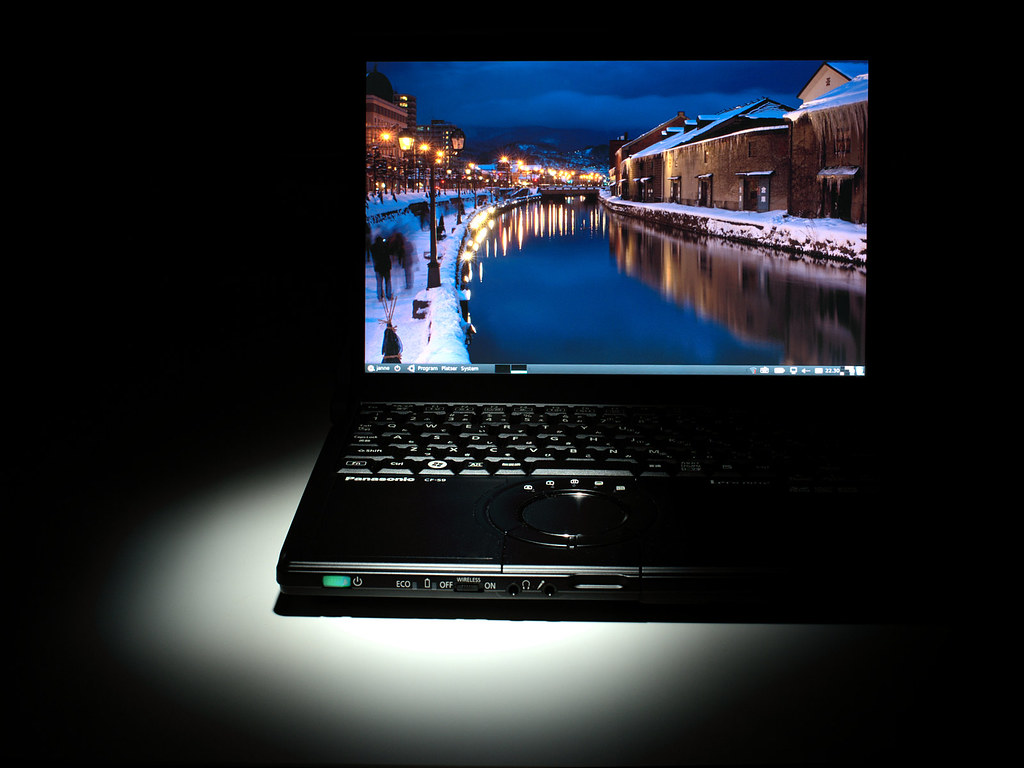
Panasonic Let's Note S9, in black. Does it look good or what?
Design is important. Looks do matter. How we perceive our tools affects how we think of them, and that in turn affects how we use them1. I'm going to be staring at this computer for many hours a day, every day, for the next three or four years and I don't want to spend all that time being irritated by the color. The price difference is not large (about 15k yen), and the extra weight is negligible. You can shut off the drive in the bios so it never drains any power at all if you don't want to use it. And did I mention how the black looks really great?
So, apart from the color, what's it like? It's a size larger than my previous notebook. That means the keyboard is full size, and while the R-series keyboard is fine - I've done all my writing and almost all programming on one for the past six years - this keyboard is a bit easier to use. It has the same layout and retains the same excellent feel.
The screen, too, is larger of course - that's the main reason I went up a size after all - and the image quality looks like it has improved. But of course, I'm comparing a brand-new screen to an old, heavily used one with a dim backlight and fading colors; it'd be rather bad if it didn't look better than that. It's a matte screen of course2 with an LED backlight (shouldn't fade over time like fluorescents do). The extra screen space makes a big difference for programming (where you want to fit as much information as possible) and image editing, but not that much for writing. It's difficult to read long lines of text so a wide screen is mostly useful to fit bits of reference information on-screen along with your text.
The larger size means the machine is larger (um, ok, surprise). The footprint is A4-sized so it's still not huge. The increase doesn't seem to have any practical downsides so far, though I've yet to find out how much of a problem it becomes in an airplane. At 1.3kg this is still a very light machine (the Lenovo I was considering is half a kilo heavier, and a Macbook Pro would add almost a kilo) but the extra weight compared the R is noticeable. It feels exactly like bringing an extra book in my backpack when I go to work every morning. It's not a problem, it's certainly not annoying, but if you really want to travel light you might want to look at the R-series or a netbook instead.
The machine is fast - clearly, obviously faster than my previous R-series notebook. Of course, that one's three years old, has half the memory, a 32-bit OS, a third of the clock speed and no active cooling so it's not surprising. More surprising is that the S9 is as fast as my home desktop and large work machine for single-threaded applications, which includes just about all everyday stuff we ever do. I'll elaborate on this in a later post.
The extra speed means more power use, which means more battery drain and a hotter machine. A larger battery accounts for a fair amount of the extra weight of this machine, so battery life is good - it lasts 6 hours, as long as the R did, even without any powersaving features enabled. The S9 has a fan, unlike the R that didn't have one, making it completely silent, but leading it to overheat if I stressed it. The fan is very quiet, though; in normal use it's virtually silent, and even when it's working hard it never gets loud or distracting.
I use Linux - the newly released Ubuntu 10.4 "Lucid Lynx" - like I do on most machines. Nowadays I always install the 64-bit version. You need to if you want to use 4Gb or more memory, and 32-bit compatibility is good enough now that there's just no reason not to use it anymore. The S9 came with Windows 7 and I started trying to set up dual-booting, but Windows was being cranky about resizing itself so I quickly gave it up and replaced it altogether. I have yet to use my dual-boot Windows installation at work after more than a year, so it's clearly not a very high-priority item for me.
Overall, the installation went without a hitch. Pop in the installation disk, answer a couple of questions and an hour later you have a shiny brand-new Ubuntu installation. There's some useful tweaks I do, for things like making a Japanese keyboard work with a Swedish layout (Japanese keyboards lack the "< > |"-key to the left of "z" for instance); I may write a separate post about that. While the initial setup is fast it does take a long while to move all the data and stuff from the old machine and reinstall all applications you depend on. I take the opportunity to clean out and sort all my stuff when I change machines so there's no way for me to do it automatically.
Most things just work out of the box. 3D acceleration, external monitor, sound, video - it's all there the first time you boot up. But it's brand-new hardware (Intel i5-520M, QM57 express chipset and Wimax 6250 wifi), and a brand-new OS version, so there's a few issues. I can't change the backlight level; there's a graphics driver bug that will kill the desktop if triggered (it has happened twice this past week); and Intel has yet to release the firmware bundle needed for the wifi. I'll sort out the backlight setting and report the graphics driver bug to the developers the next time it happens. Both are probably pretty simple fixes. Intels delay in releasing the firmware is pretty annoying though. Wifi is a convenience rather than a necessity for me at the moment so I'm willing to wait, but if it takes too long I'll either have to do some workaround using the Windows drivers or use an old wifi adapter I have lying around.
Overall, it's a very pleasant machine. It hits the sweet spot for me between size and power, and of course, it looks great. Once the remaining issues are sorted out it will be pretty much perfect.
--
#1 You'd think, for instance, that a country's military forces are ruthlessly utilitarian, but even they think about perception. When the Swedish army was moderinzing their uniforms in the 1990's, studies had shown that a solid green was the best color for the Swedish terrain. They nevertheless settled on a camouflage pattern, because the slight difference in effectiveness was more than offset by the improvement in troop morale and self-confidence from wearing a cool-looking pattern.
Also, army vehicles and weapons always seem to get names like Leopard or Black Hawk while names like Fluffy Bunny or Bambi are notably rare.
Also, army vehicles and weapons always seem to get names like Leopard or Black Hawk while names like Fluffy Bunny or Bambi are notably rare.
#2 Glossy screens look great in the store, with deep blacks and vivid colors - that's why some makers go for glossy of course, since they sell well. But the screens act as mirrors, reflecting everything bright or light-colored facing the screen. That means you'll spend your working days looking at reflections of your own face and hands, the ceiling lights, windows, other people's desk lamps, bright walls, alien abductions and so on.
It's not only distracting, but it's actively harmful if you do something that needs good color or brightness rendition, such as when you edit pictures. The reflections change the perceived contrast and color where they fall, and getting the image right becomes pure guesswork. You increase contrast in one area, only to realize that there was a sunlit wall reflected there, and now the contrast is too much. Sure, you could kill all lights, cover the windows and - I don't know - wear a ski mask and gloves I guess, but it seems easier to simply get a good screen instead of rearranging your life to suit a bad one.
It's not only distracting, but it's actively harmful if you do something that needs good color or brightness rendition, such as when you edit pictures. The reflections change the perceived contrast and color where they fall, and getting the image right becomes pure guesswork. You increase contrast in one area, only to realize that there was a sunlit wall reflected there, and now the contrast is too much. Sure, you could kill all lights, cover the windows and - I don't know - wear a ski mask and gloves I guess, but it seems easier to simply get a good screen instead of rearranging your life to suit a bad one.
Tuesday, April 27, 2010
Need a New Computer
My laptop computer - a Let's Note R6 from Panasonic - is breaking down on me. It's small, light and rugged, and I use it all day long, almost every day. Simulations and games are right out of course, but it's good enough for programming, writing and things like that. My previous machine - the Panasonic R3 - lasted me for four years of heavy daily use, by which time the screen was growing dim and red, the battery life was down to half an hour and you could no longer reliably type 'P', return or backspace1. The R6 is a little less than three years old.
It started about six months ago: when I plugged in an external monitor, the screen would go blank, forcing me to reset the screen. Later, it would not only go blank, but actually crash the computer; if I want to use an external screen I now need to reboot with the screen attached2. There's also been occasional graphics glitches - disappearing lines, garbled text and the like. Some software bug, I thought, and perhaps some electrical problem with the external monitor connector.
But about two weeks ago the screen started to freeze randomly, once or twice a day. The static screen image is visible, but frozen. Sometimes the mouse pointer will still move. Sometimes the screen is completely frozen. A few times I've gotten an immediate reset and reboot. There is nothing at all in the log; as far as the OS and applications are concerned the graphics system is fine. I can log in remotely from another computer and all software is still obviously working and displaying stuff. Restarting X does not help - the screen image is frozen no matter what you do. It seems pretty clear to me now that the graphics hardware on this machine is dying. The machine runs pretty hot, so I guess thermal damage could be the culprit.
This is very inconvenient. While I don't use this machine for simulations, I do use it for just about everything else. Whenever the screen freezes I need to reboot, and lose the last bit of work I've done. Worse, it completely derails my train of thought. The computer desktop is my short-term memory, with all the open documents reminding me of what I'm doing. After a reboot it takes a long while to get back up to speed again, and some stuff, like writing blog posts, I may completely forget about for days. I need a new computer.
As it turns out, this is a pretty bad time for the computer to break. I use it a lot for work, but the project doesn't have a budget for big-ticket items at the moment, so I'll have buy the new machine myself. The question is which one. My current machine is small - 10.4" screen, and just under one kilo - with decent memory and ok speed. The battery was rated at 7.5 hours, which was about five hours in practice when new (it's down to 3.5h or so now). I'd like to keep the low weight and good battery life, but this time go for a wide-screen model. That would give a bit of much-needed extra screen space without making the computer much larger. Whatever I get needs to be compatible with Ubuntu Linux.
I'm inclined to get another Panasonic, since they're rugged and good quality (my problem notwidstanding). Perhaps an N9; it's the wide-screen version of my current machine but it's a fair bit faster, and has as good or better battery life. It'd be a little heavier at 1.26 kg, but not so much that I'd be bothered by it. The Let's Note series are rugged - they handle drops, falls and heavy weights, and the keyboard is water/coffee-proof. It's got good wireless connectivity with Wifi, Wimax and Bluetooth; there's both analog and hdmi video ports, and an SD-card reader.
Someone suggested a Thinkpad X201 as an alternative. It's about the same type as the Panasonic and it'd be a bit cheaper - though not by that much once you configure it similarly. It has a trackpoint in addition to the trackpad, and of course it's black, not painted silver. On the downside, it'd be heavier, have shorter battery life and not be nearly as rugged. I'd also feel better about buying a machine designed and assembled locally here in Osaka rather than get an import brand. And of course, I know that Ubuntu works fine on the Panasonic; I'm not as certain about the Thinkpad.
Whichever I get, I'm getting it soon. It's distracting - exhausting - to mentally look over your shoulder as you work for any signs of the computer freezing up on you. It's scary in a way, to be so reliant on a piece of equipment.
--
It started about six months ago: when I plugged in an external monitor, the screen would go blank, forcing me to reset the screen. Later, it would not only go blank, but actually crash the computer; if I want to use an external screen I now need to reboot with the screen attached2. There's also been occasional graphics glitches - disappearing lines, garbled text and the like. Some software bug, I thought, and perhaps some electrical problem with the external monitor connector.
But about two weeks ago the screen started to freeze randomly, once or twice a day. The static screen image is visible, but frozen. Sometimes the mouse pointer will still move. Sometimes the screen is completely frozen. A few times I've gotten an immediate reset and reboot. There is nothing at all in the log; as far as the OS and applications are concerned the graphics system is fine. I can log in remotely from another computer and all software is still obviously working and displaying stuff. Restarting X does not help - the screen image is frozen no matter what you do. It seems pretty clear to me now that the graphics hardware on this machine is dying. The machine runs pretty hot, so I guess thermal damage could be the culprit.
This is very inconvenient. While I don't use this machine for simulations, I do use it for just about everything else. Whenever the screen freezes I need to reboot, and lose the last bit of work I've done. Worse, it completely derails my train of thought. The computer desktop is my short-term memory, with all the open documents reminding me of what I'm doing. After a reboot it takes a long while to get back up to speed again, and some stuff, like writing blog posts, I may completely forget about for days. I need a new computer.
As it turns out, this is a pretty bad time for the computer to break. I use it a lot for work, but the project doesn't have a budget for big-ticket items at the moment, so I'll have buy the new machine myself. The question is which one. My current machine is small - 10.4" screen, and just under one kilo - with decent memory and ok speed. The battery was rated at 7.5 hours, which was about five hours in practice when new (it's down to 3.5h or so now). I'd like to keep the low weight and good battery life, but this time go for a wide-screen model. That would give a bit of much-needed extra screen space without making the computer much larger. Whatever I get needs to be compatible with Ubuntu Linux.
I'm inclined to get another Panasonic, since they're rugged and good quality (my problem notwidstanding). Perhaps an N9; it's the wide-screen version of my current machine but it's a fair bit faster, and has as good or better battery life. It'd be a little heavier at 1.26 kg, but not so much that I'd be bothered by it. The Let's Note series are rugged - they handle drops, falls and heavy weights, and the keyboard is water/coffee-proof. It's got good wireless connectivity with Wifi, Wimax and Bluetooth; there's both analog and hdmi video ports, and an SD-card reader.
Someone suggested a Thinkpad X201 as an alternative. It's about the same type as the Panasonic and it'd be a bit cheaper - though not by that much once you configure it similarly. It has a trackpoint in addition to the trackpad, and of course it's black, not painted silver. On the downside, it'd be heavier, have shorter battery life and not be nearly as rugged. I'd also feel better about buying a machine designed and assembled locally here in Osaka rather than get an import brand. And of course, I know that Ubuntu works fine on the Panasonic; I'm not as certain about the Thinkpad.
Whichever I get, I'm getting it soon. It's distracting - exhausting - to mentally look over your shoulder as you work for any signs of the computer freezing up on you. It's scary in a way, to be so reliant on a piece of equipment.
--
#1 Backspace and Enter I understand, but why 'P'? I have no idea.
#2 Last time this happened when I was giving a short presentation at a project meeting in Tokyo. A good reminder not to be too dependent on your presentation software.
Subscribe to:
Posts (Atom)